Control your MiniDalek with WiFi
from your phone or tablet


   Boot up your MiniDalek with latest wifi_minidalek_01.zip  (10-02-2026)
   Put the 03-wifiAudio folder on your SD card wifi-minidalek audio files

   On your Cell phone or tablet to connect this access point:

ssid = "MiniDalek-RC"
password="12345678"

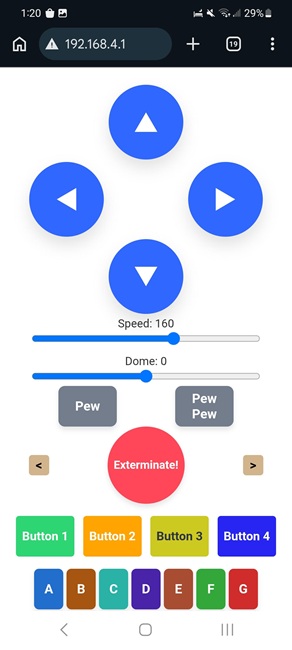
 goto http://192.168.4.1 on this network for control panel

=====================


The colored buttons at the bottom of the screen will cycle through the specified sound clips or music stored in the "03" folder of your SD card.

The greater than[>] will skip past the next sound.
The less than[<] will replay the last sound.  Press multiple times to go back/forward further.

 Button   Dalek  R2D2  Button  Dalek  R2D2
 Button1

 Button2

 Button3

 Button4

 210-219

 220-229

 230-239

 240-249

 040-044

 045-049

 050-054

 055-059

  ButtonA

  ButtonB

  ButtonC

  ButtonD

  ButtonE

  ButtonF

  ButtonG

 110-119

 120-129

 130-139

 140-149

 150-159

 160-169

 170-179


 060-064

 065-069

 070-074

 075-079

 080-084

 085-089

 090-094


We also have some "Buried Extra Features" (BEF codes).

Type these sequences in the bottom keys:

BEF311 - Toggle VOLUME MODE on and off. This mode lets you set the volume using the SPEED slider. VOLUME MODE cancels after 90 seconds.

BEF322 - Toggle between DALEK MODE and R2D2 MODE.

BEF321 - Toggle between TWO WHEEL TURN MODE and ONE WHEEL TURN MODE.